McModknower
Modded Minecraft Crash Database
This file will contain a bunch of error messages from modded Minecraft crashes, with the intent that you can use your browsers search function to quickly search for your problem. (As such some headings have multiple exception messages directly below it, so your browsers search function can find them)
Most of the stuff i write about here is stuff i found in logs people asked for help with on the Modded Minecraft Discord. If you need more help than this guide can provide, i can only recommend asking over there.
[!IMPORTANT] Before changing stuff in a world you played on, DO A BACKUP. You might lose all progress in your world otherwise. And like a friend of mine told me: No backup, no mercy.
Useful links
Firstly, here are some links for more info or help:
- Modded Minecraft Usual Suspects (my own list on mods/data packs to suspect first if anything acts up)
- Modded Minecraft Link Collection where i collect all sorts of modded minecraft links not fitting into other pages
- Crash Assistant (mod that can help you with reading and sharing logs) Alternative CurseForge link
- MultiMC FAQ (useful for basic troubleshooting like having the wrong java version)
- Prism Launcher Wiki (useful for basic troubleshooting if using Prism Launcher)
- superpowers04's recommendations (pages containing minecraft information, recommendations, what you should avoid, etc)
- Modded Minecraft Discord and the Modded Minecraft subreddit it is affiliated with. (good for asking for help with your problems)
- My own link collection (a lot of discords, and some other stuff)
What to search for
To search for an error, you need to know what part of the crash report you should search for. On this site i will mostly only include the exception itself as text, so get that one.
crash-<DATE>_<TIME>-<SIDE>.txt
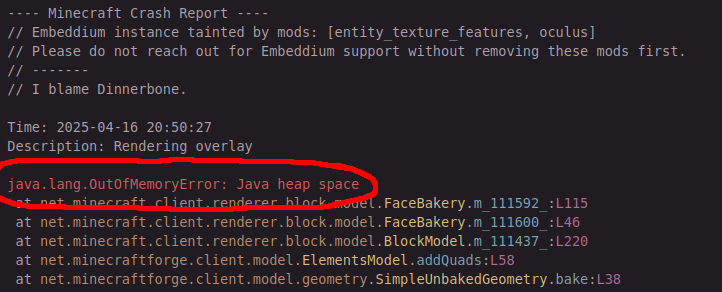
In a crash report (for example a file like crash-2025-03-29_13.24.00-client.txt, which begins with ---- Minecraft Crash Report ----), the exception is normally pretty close to the top and contains Exception or Error. Check the following image for an example.
latest.log
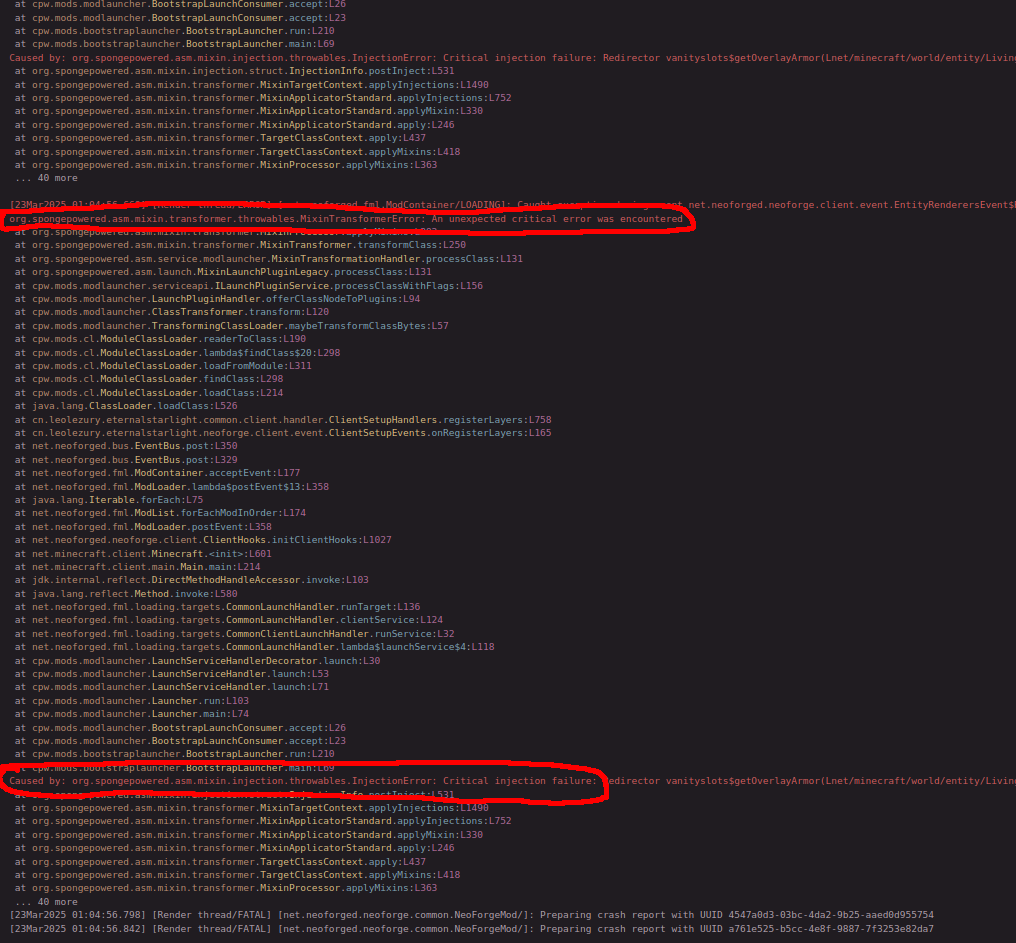
In a latest.log, the exception is normally close to the bottom of the log, as seen in the following image, and contains Exception or Error like in a crash report.
But there are other cases in which the actual error is further up:
- It contains a
Missing or unsupported mandatory dependenciesline: see below in the section with that name. - It contains
Cowardly refusing to send event: continue here.
This line looks like the following:
[04Apr2025 22:53:51.730] [Render thread/ERROR] [net.neoforged.fml.ModLoader/]: Cowardly refusing to send event net.neoforged.neoforge.client.event.TextureAtlasStitchedEvent to a broken mod state
If you see any line like this (starting with Cowardly refusing to send event and ending with to a broken mod state), that means the real error happened before the first one of these lines. Scroll up or use you editor's/log viewer's search feature to go to the first one, then go up to the closest exception.
Often times the problem is in a stack trace that is directly after line containing Failed to create mod instance, Failed to register automatic subscribers, Exception caught during firing event:, Error during pre-loading phase: or encountered an error in a deferred task. If a line containing that exists, the problem is very likely in that stack trace.
If the latest log does not contain the error, you have to check one of the other files listed here, most likely the crash report.
launcher_log.txt
Launcher logs have the error message normally near the last line that contains MinecraftJavaLoggingContext, as shown in the following image.
hs_err_pid<number>.log
JVM crash reports (hs_err_pid<number>.log) are very different and will be listed here sometime in the future, but are not the focus for now.
Other problems without relevant stuff in the logs
Freeze when opening the creative inventory on NeoForge 1.21.1
If you have libJF v 3.17.4 or below, update to 3.17.5 or later. See https://git.jfronny.dev/JfMods/LibJF/issues/16 for more info or https://modrinth.com/mod/libjf/versions?g=1.21.1 for download links.
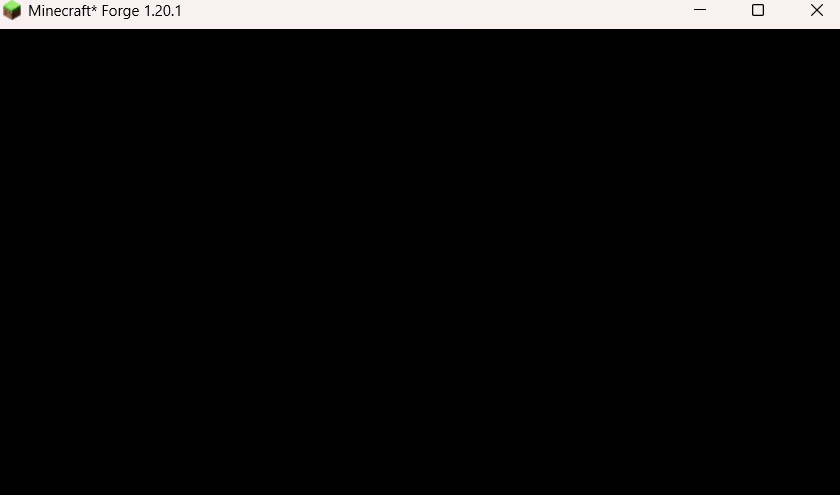
black game, but working window decorations
If your game looks like this, and you have both an integrated and dedicated graphics card, try setting Minecraft to run under the dedicated graphics card.
The errors that are not actually the error
Exception in thread "main" java.lang.RuntimeException: java.lang.reflect.InvocationTargetException
Caused by: java.lang.reflect.InvocationTargetException
java.lang.RuntimeException: null
This one is a generic error and means you need to look further down for lines starting with Suppressed or Caused by to find the real error
java.lang.Exception: Mod Loading has failed
This one is a generic error and means you have to go below the A detailed walkthrough of the error, its code path and all known details is as follows: line to find the real cause. Like above, check for lines starting with Suppressed or Caused by. Additionally, lines containing Failure message: or Exception message: can mark interesting points.
java.lang.IllegalStateException: Failed to load registries due to above errors
This means some registry errors occurred. Those are only visible in the latest.log, so check it.
I personally search for Registry loading errors: in the latest.log, and from that read downwards through the lines that are not starting with <tab>at .
For interpretation of those lines, see the section Registry loading errors.
java.lang.RuntimeException: One of more entry values did not copy to the correct id. Check log for details!
Search your log for the first instance of Exception caught during firing event.
Stuff during mod loading likely caused by an invalid state since previous errors didn't let the mods loads correctly
java.lang.IllegalStateException: Cannot get config value before config is loaded.java.util.NoSuchElementException: No value presentjava.util.NoSuchElementException: nulljava.lang.NullPointerException: Initializing gamejava.lang.RuntimeException: java.lang.NullPointerException: Cannot invoke "net.minecraft.client.KeyMapping.getKey()" because "this.backKey" is nullCaused by: net.minecraft.server.ChainedJsonException: Invalid shaders/core/elytratrims_gateway.json: File not foundjava.lang.IllegalStateException: Mod 'architectury' is not available!java.lang.NullPointerException: Mod with id iris not found in ModListjava.lang.IllegalStateException: Multiple servers running at once is not supported!
Very likely caused by some other problem in the log.
For the ones involving a name (this.backKey, elytratrims_gateway.json, architectury, iris) this applies even if that name is different.
Check the log for Cowardly refusing to send event, Failed to create mod instance or Failed to register automatic subscribers lines.
More about those messages (and other lines to search for) is written above in the latest.log section.
If there is no such line in the latest.log, this can also be the real problem (and as such the real stack trace).
Incompatibilities & Missing dependencies
(These two have similar symptoms, so I bundled them together)
java.lang.NoClassDefFoundError and java.lang.ClassNotFoundException
This error normally means one of the following things:
- You have a mod which needs some other mod (dependency) which is not installed. In this case, install the dependency or remove the mod.
- You have a mod (A) which has compatibility with some other mod (B) built-in, but A was made for a different version of B. In this case, change the version(s) of these mods until it works. Normally updating both (or just A) works
- you have a mixin error somewhere before in the latest log
In this case go to that error (it will contain
mixinsomewhere) and search for that exception message.
An example for case 1 is the following, where protection_pixel is missing a dependency.
However since depending on kleidersplayerrenderer heavily implies that the mod is an mcreator mod, I recommend disabling protection_pixel.
[14Jan2026 15:21:13.102] [modloading-worker-0/ERROR] [net.neoforged.fml.javafmlmod.FMLModContainer/LOADING]: Failed to register automatic subscribers. ModID: protection_pixel
java.lang.NoClassDefFoundError: com/kleiders/kleidersplayerrenderer/KleidersSkinRenderer
One example where its cause 2 is the following, where the ars_elemancy version is made for a different ars_elemental version.
[13Jan2026 13:13:15.835] [modloading-worker-0/ERROR] [net.neoforged.fml.javafmlmod.FMLModContainer/LOADING]: Failed to create mod instance. ModID: ars_elemancy, class lyrellion.ars_elemancy.ArsElemancy
java.lang.NoClassDefFoundError: alexthw/ars_elemental/api/item/IElementalArmor
...
	at lyrellion.ars_elemancy.common.items.armor.ArmorSet.<init>:L22
Create 6
Create 6 broke a bunch of compatibilities that mods had built-in. if you get any of the exceptions listed here, check what mod is listed directly below that error and update it to a version that supports create 6, or disable that mod.
For Example in the following case, ComputerCraft (aka cc: tweaked) is the mod that needs to be updated:
 Suppressed: java.lang.NoClassDefFoundError: com/simibubi/create/content/contraptions/BlockMovementChecks$AttachedCheck
	at dan200.computercraft.shared.integration.CreateIntegration.setup:L23
-
Suppressed: java.lang.NoClassDefFoundError: com/simibubi/create/content/contraptions/BlockMovementChecks$AttachedCheckCaused by: java.lang.ClassNotFoundException: com.simibubi.create.content.contraptions.BlockMovementChecks$AttachedCheckknown mods that can cause this: computercraft -
Caused by 0: java.lang.NoClassDefFoundError: Could not initialize class com.simibubi.create.AllBlocksknown mods that can cause this: railways (aka Create: Steam 'n' Rails) -
Caused by: java.lang.NoClassDefFoundError: com/simibubi/create/api/registry/CreateRegistriesknown mods that can cause this issue: Ad Astra -
Caused by: org.spongepowered.asm.mixin.throwables.ClassMetadataNotFoundException: com.jozufozu.flywheel.backend.gl.GlStateTrackerknown mods that can cause this issue: oculus flywheel compat
Error loading class: net/caffeinemc/mods/sodium/api/memory/MemoryIntrinsics (java.lang.ClassNotFoundException: net.caffeinemc.mods.sodium.api.memory.MemoryIntrinsics)
This is a nice example where one mod is missing its dependency, but it is not as nicely formatted as below under Missing or unsupported mandatory dependencies:.
In the log this is from, Embeddium (which is a forge port of Sodium) was missing, and Oculus (which is a forge port of Iris) requires it to work.
java.lang.RuntimeException: Could not load super class com/finderfeed/fdlib/nbt/AutoSerializable of com/finderfeed/cataclysm_custscenes/entities/maledictus/MaledictusCutsceneEntity
The second class (com/finderfeed/cataclysm_custscenes/entities/maledictus/MaledictusCutsceneEntity) requires the first class (com/finderfeed/fdlib/nbt/AutoSerializable),
but java could not find the first class.
In this example case, cataclysm_custscenes (aka Cinematic Cataclysm) requires fdlib.
java.lang.NoSuchMethodError, java.lang.NoSuchFieldError, and java.lang.IncompatibleClassChangeError
This is similar to the errors about classes above, but i only know of it in cases where mod A was made for a different version of mod B.
For example in the following exception, ironsspellbooks was made for a different tetra version:
java.lang.NoSuchMethodError: 'void se.mickelus.tetra.gui.stats.getter.StatGetterAttribute.<init>(net.minecraft.world.entity.ai.attributes.Attribute, boolean, boolean, double)'
    at io.redspace.ironsspellbooks.compat.tetra.StatGetterPercentAttribute.<init>:L10
And here another Example with the other exception type, where sculkhornid was made for a different anvianslib version:
java.lang.IncompatibleClassChangeError: Expected static method 'void net.anvian.anvianslib.config.TelemetryConfigManager.initialize(java.io.File)'
    at net.anvian.sculkhornid.CommonMod.init:L13
Because this happened multiple times recently (as of 2026-01-12), dynamictreesplus being made for a different dynamictrees version:
java.lang.NoSuchFieldError: Class com.dtteam.dynamictrees.api.season.ClimateZoneType does not have member field 'com.dtteam.dynamictrees.api.season.ClimateZoneType ARID'
    at com.dtteam.dynamictreesplus.tree.CactusSpecies.setPreReloadDefaults:L55
And one example of the relatively rare case that a mod was made for a different version of the mod loader (forge/neoforge/fabric/...), where the first line says something involving net.minecraft:
java.lang.NoSuchMethodError: 'net.minecraft.resources.ResourceLocation net.minecraft.resources.ResourceLocation.fromNamespaceAndPath(java.lang.String, java.lang.String)'
    at tallestred.numismaticoverhaul.cap.CurrencyHolderAttacher.<clinit>(CurrencyHolderAttacher.java:19) ~[numismaticoverhaul-1.20.1-2.0.1.jar#239!/:2.0.1] {re:mixin,re:classloading}
java.lang.UnsupportedClassVersionError
This one means you have a .jar which was made for a newer java version than the one you have. It is caused by having a mod for a newer minecraft version, using the wrong java version (MultiMC Wiki Page on using the right Java), or having a mod author provide a faulty mod.
Most likely it will be the first case, like in the following example where someone had a newer version of cloth config:
java.lang.UnsupportedClassVersionError: me/shedaniel/clothconfig/ClothConfigForge has been compiled by a more recent version of the Java Runtime (class file version 65.0), this version of the Java Runtime only recognizes class file versions up to 61.0
Missing or unsupported mandatory dependencies:
This message (if it exists) is followed by a list of mods and what dependencies are not met, for example in the following case the installed presencefootsteps version was made for a newer forge version:
[13:02:59] [main/ERROR]: Missing or unsupported mandatory dependencies:
	Mod ID: 'forge', Requested by: 'presencefootsteps', Expected range: '[47.2.19,)', Actual version: '47.2.0'
java.lang.NullPointerException: Cannot invoke "net.fabricmc.fabric.api.renderer.v1.Renderer.meshBuilder()" because the return value of "net.fabricmc.fabric.api.renderer.v1.RendererAccess.getRenderer()" is null
Caused by: java.lang.IllegalStateException: The Fabric Rendering API is not available. If you have Sodium, install Indium!
You have sodium but not indium, and some other mod (like continuity) needs indium to work if sodium is installed.
Fix it by installing indium.
java.lang.module.ResolutionException
Sometimes happens because one mod contains code that another mod also contains, and a third mod uses that code, in a way that java doesn't like. In the following case, tac and some unnamed mod contain stuff that kubejs uses. Remove one of the sources to fix this problem.
If you have an unnamed mod as in this case, you can search for what mod contains that using the crash assistant mod (link at the start of this page).
Exception in thread "main" java.lang.module.ResolutionException: Modules com.fasterxml.jackson.core and tac export package com.fasterxml.jackson.core.format to module kubejs
mixin errors
org.spongepowered.asm.mixin.transformer.throwables.MixinTransformerError: An unexpected critical error was encountered
Caused by: org.spongepowered.asm.mixin.injection.throwables.InjectionError: Critical injection failure:
Caused by: java.lang.RuntimeException: org.spongepowered.asm.mixin.transformer.throwables.MixinTransformerError: An unexpected critical error was encountered
Caused by: org.spongepowered.asm.mixin.transformer.throwables.MixinTransformerError: An unexpected critical error was encountered
org.spongepowered.asm.mixin.injection.throwables.InvalidInjectionException:
These errors are from the mixin system, which is made to allow changing code from other mods or minecraft itself.
They normally indicate incompatibilities between different mods, but can also mean you are running a mod on a minecraft version it doesn't work with.
Skim through the rest of the line(s) for mod names, those are the ones involved. Try disabling them. If it works, check for up/downgrades, like above for the NoClassDefFoundError.
If there is no mod in the first line with one of these errors, check the Caused by lines below it for mod names.
Caused by: org.spongepowered.asm.mixin.injection.throwables.InjectionError: Critical injection failure: Callback method pehkui$canUse$distance(FLnet/minecraft/world/entity/player/Player;)F in pehkui.mixins.json:compat1204minus.HorseScreenHandlerMixin from mod pehkui failed injection check, (0/1) succeeded. Scanned 1 target(s). Using refmap Pehkui-refmap.json
Can you spot the four times that pehkui is mentioned in there? That is the mod that is causing this error.
See https://github.com/Virtuoel/Pehkui/issues/591#issuecomment-2987838440 for more info.
org.spongepowered.asm.mixin.injection.throwables.InvalidInjectionException: @At
Sometimes two mods try to change the same thing with mixins, and the game crashes since there is no automatic way to do what both mods wanna do. An example is the following line, where netherexp and icv both want to change something about bows. In cases like these, you remove one of the mods.
org.spongepowered.asm.mixin.injection.throwables.InvalidInjectionException: @At("INVOKE") on net/minecraft/world/item/BowItem::netherexp$modifyArrowVelocity with priority 1000 cannot inject into net/minecraft/world/item/BowItem::m_5551_(Lnet/minecraft/world/item/ItemStack;Lnet/minecraft/world/level/Level;Lnet/minecraft/world/entity/LivingEntity;I)V merged by net.igneo.icv.mixin.BowItemMixin with priority 999999999 [PREINJECT Applicator Phase -> mixins.netherexp.json:item.BowItemMixin from mod netherexp -> Prepare Injections -> -> wrapOperation$zbg000$netherexp$modifyArrowVelocity(Lnet/minecraft/world/entity/projectile/AbstractArrow;Lnet/minecraft/world/entity/Entity;FFFFFLcom/llamalad7/mixinextras/injector/wrapoperation/Operation;)V -> Prepare]
RAM problems
java.lang.OutOfMemoryError: Java heap space
That means you need to allocate more ram (-Xmx) to your modpack, or you have to reduce the load by using less shaders, resource packs, mods, etc.
connection problems
\u0000 and similar when trying to connect to a server/LAN world
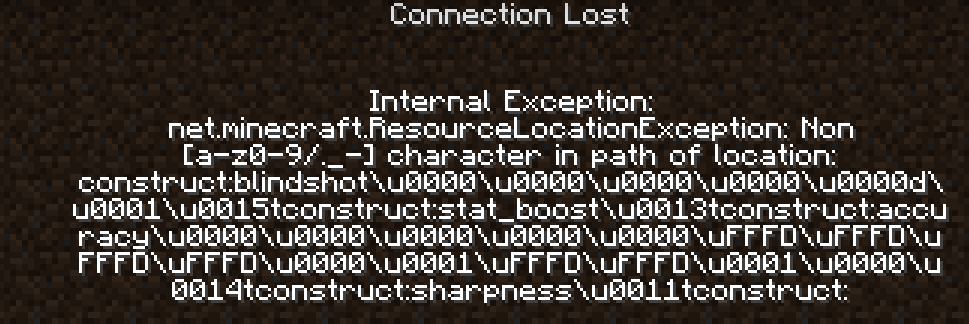
This is normally caused by having different versions of some mods on client and server. Either get a fresh copy of a working pack from a friend, update the mods on the side where you didn't update them, or copy the mods from the server to the client.
Registry loading errors
After a line like [08Oct2025 17:03:37.185] [Render thread/ERROR] [net.minecraft.resources.RegistryDataLoader/]: Registry loading errors:, there are normally multiple errors, often related to each other.
It starts with a line with one > at its start, for example > Errors in registry minecraft:root:
Afterwards there will be entries consisting of one line starting with two >>, for example >> Errors in element minecraft:worldgen/configured_feature:, followed by a normal stack trace.
If you see a line containing Unbound values in registry as the exception of one of the stack traces, those unbound values might be things that failed to load themselves, and are visible further down.
For example the line java.lang.IllegalStateException: Unbound values in registry ResourceKey[minecraft:root / minecraft:worldgen/configured_feature]: [ars_monde:grass_vegetation, ars_monde:moss_vegetation, ars_monde:purple_grass_vegetation] means that three things in the category minecraft:worldgen/configured_feature are either missing or failed to load: ars_monde:grass_vegetation, ars_monde:moss_vegetation, and ars_monde:purple_grass_vegetation.
As you can see from these names, the part before the colon : is normally the mod name, while the part behind it is some name for the thing itself.
In my example case, there are three stack traces below the first one, corresponding to the three values that failed to load.
Each one begins with >> Errors in element ars_monde:grass_vegetation: (and similar for the other names).
These stack traces each start with a line like java.lang.IllegalStateException: Failed to parse ars_monde:worldgen/configured_feature/grass_vegetation.json from pack openloader/C:\Users\********\curseforge\minecraft\Instances\Main\datapacks\ars_monde.zip, which in this case even names the data pack that caused the problem, followed by a bunch of <tab>at ... lines, followed by a line like Caused by: java.lang.IllegalStateException: Unknown registry key in ResourceKey[minecraft:root / minecraft:block]: farmersdelight:wild_rice; Unknown registry key in ResourceKey[minecraft:root / minecraft:block]: farmersdelight:wild_beetroots; Unknown registry key in ResourceKey[minecraft:root / minecraft:block]: farmersdelight:wild_carrots; Unknown registry key in ResourceKey[minecraft:root / minecraft:block]: farmersdelight:wild_tomatoes; Unknown registry key in ResourceKey[minecraft:root / minecraft:block]: farmersdelight:wild_cabbages; Unknown registry key in ResourceKey[minecraft:root / minecraft:block]: farmersdelight:sandy_shrub; Unknown registry key in ResourceKey[minecraft:root / minecraft:block]: farmersdelight:wild_onions; Unknown registry key in ResourceKey[minecraft:root / minecraft:block]: farmersdelight:red_mushroom_colony; Unknown registry key in ResourceKey[minecraft:root / minecraft:block]: farmersdelight:brown_mushroom_colony; Unknown registry key in ResourceKey[minecraft:root / minecraft:block]: farmersdelight:wild_potatoes
This Caused by: line is describing what went wrong. The feature from ars_monde tries to use stuff from farmersdelight, which doesn't exist in this game.
This can be caused by the mod being in a different version, or by some mod just not being installed as it was in this case.
(That means this can actually be an instance of the very common Incompatibilities & Missing dependencies problems.)
Uncategorized
java.lang.NullPointerException: Registry Object not present:
This can be caused by a mod that is installed on your client but not on your server. If that is the case, you can simply remove the mod from your client to fix the problem.
The mod in question is the one named directly after the colon in that line, for example in the following line it is hardcore_torches.
java.lang.NullPointerException: Registry Object not present: hardcore_torches:lit_torch
com.google.gson.JsonSyntaxException: Expected a com.google.gson.JsonArray but was com.google.gson.JsonObject; at path $
Some json file is broken. If this happens on a server, check if your banned-ips.json and banned-players.json contain {}. If yes, simply delete the file(s) containing just {}.
Exception message: net.minecraft.ResourceLocationException: Non [a-z0-9/._-] character in path of location: dndecor:\u0131ndustrial_frontlight
This \u0131 character is a lowercase dotless I. It happens when your system is set to a locale where that character is the lowercase variant of the normal uppercase I and some mod tries to automatically generate IDs from text that contains an uppercase I.
Report it to the mod author so they can fix it by using .toLowerCase(Locale.Root) in their code, and fix it for yourself by setting the locale java uses to English with -Duser.language=en added to your java arguments (MultiMC and Prism do this automatically).
java.lang.RuntimeException: Invalid id 4096 - maximum id range exceeded.
This is caused by adding too many mods which add blocks. The solution is to add the Roughly Enough ID’s mod, which extends the limits for blocks, items, and biomes. Download the mod from Modrinth or Curseforge If you use the latest release of REID, you will also need mixinbootstrap from Modrinth or Curseforge
Copied from a bot macro on the Modded Minecraft Discord.
Exception in thread "main" cpw.mods.niofs.union.UnionFileSystem$UncheckedIOException: java.io.IOException: Data error (cyclic redundancy check)
An error while loading a jar. One of your mods probably corrupted, if it lists a specific jar file, reinstall that jar. Else re-download all mods.
java.lang.IllegalArgumentException: Payload may not be larger than 1048576 bytes
Your playerdata, an entity in the world, a chunk, or similar is too big. Add Packet Fixer or a similar mod to fix this problem. Or remove mods until you are below the packet limit.
java.lang.IllegalStateException: Item: galosphere:silver_ingot does not exist
Galosphere removed the silver ingot in an update, at a time where a bunch of other mods no longer supported/updated their mc 1.20.1 versions. Create: Fixed fixes this IF you are in mc 1.20.1 AND have create.
java.util.ConcurrentModificationException: null
Either you have some mod in the stacktrace below the exception, or its time for a binary search.
If the line above says [Render thread/ERROR] [net.minecraft.client.Minecraft/]: Shutdown failure!,
Minecraft failed while shutting down, and you probably got no crash report or stacktrace with the real problem.
java.lang.IllegalStateException: Feature order cycle found, involved sources:
Install https://modrinth.com/mod/feature-recycler or remove one of the mods mentioned in the exception message.